

COUNTER FLOW :: www.FlowGalindez.comCOUNTER FLOW :: www.FlowGalindez.com
  • Home
  • Entertainment
  • Lifestyle
  • Tech News
  • Advocacy
  • Get In Touch
Facebook Twitter Instagram
COUNTER FLOW :: www.FlowGalindez.comCOUNTER FLOW :: www.FlowGalindez.com
Subscribe
  • Home
  • Entertainment
  • Lifestyle
  • Tech News
  • Advocacy
  • Get In Touch
COUNTER FLOW :: www.FlowGalindez.comCOUNTER FLOW :: www.FlowGalindez.com
Home»Featured Articles»LG Pocket Photo: inkless printing of photos straight from your smartphone
Featured Articles

LG Pocket Photo: inkless printing of photos straight from your smartphone

FlowBy FlowOctober 12, 2013No Comments2 Mins Read
Facebook Twitter Pinterest LinkedIn Tumblr Email
Share
Facebook Twitter LinkedIn Pinterest WhatsApp Email Reddit

We all love taking photos and post it online in our social network accounts, and being so digital we forgot the feeling and fun of having a printed versions of those pictures just like before. We do miss those days where we can still be creative with our photo albums and scrapbooks as we keep and narrate beautiful memories though photos with additional designs of paper cut outs and captions and we up just posting it on our Facebook and Instagram. With the latest innovation that LG spearheaded, they will be combining digital with traditional with their latest product the LG Pocket Photo.

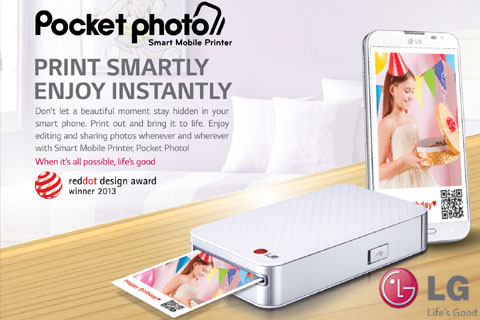
With the LG Pocket Photo, we can print photos from our smartphones using Bluetooth or NFC. The concept is just like the old Polaroid cameras where after taking photos through thermal technology plus ink and photo paper we can have the printed version in few minutes. But with the LG Pocket Photo, it uses ZINK or zero ink technology that it doesn’t use ink to eliminate expensive ink cartridges and smearing of ink. Instead the zink technology uses only heat from the device to produce detailed and beautiful photos from the photo paper. Plus printing only lasted for 45 seconds.

LG-Pocket-Photo

For those who wanted to edit the brightness, hue and saturation there’s the LG Pocket Photo application that can be downloaded via Apple App Store for iOS devices and Google Play for Android powered smartphones. They can also edit and crop the photo, add captions, QR codes and other designs before sending the photo via Bluetooth or NFC to the LG Pocket Photo for printing.

What’s good with the device is that it is easy carry because it only weighs just an ordinary smartphone with the dimension of 72.4 x 120.9 x 24 mm or a little bit bigger than the LG G2. The device only cost Php 6, 990 that includes the unit itself, adapter, quick guide, and 2 x 3 Zink Media photo paper; 6 pouches of 10 pieces each and 10 pieces inside the device. The Zink Media photo paper is available in LG authorized dealers and LG Concept Stores for only Php 300 per pouch with 10 pieces inside.

lg LG Pocket Photo Tech & Gadgets
Share. Facebook Twitter Pinterest LinkedIn Tumblr Email Reddit
Previous ArticleKimpoy Feliciano now endorses Mossimo
Next Article Sam Milby is the first ever brand endorser of Systema Tooth and Gum Care in the Philippines
Flow
  • Website
  • Facebook
  • Instagram

Related Posts

Get discounted MRT-3 rides with GCash from December 8 to 22

December 4, 2025

Security Bank partners with WIZ.AI to elevate customer engagement with advanced conversational AI

November 30, 2025

Just tap and go when you link your Maya Credit Card to Google Pay!

November 21, 2025

Comments are closed.

Latest Posts

Get discounted MRT-3 rides with GCash from December 8 to 22

December 4, 2025

Your bonus just dropped and here’s how to make it work harder with Maya

December 4, 2025

Ayala Malls Cinemas launches a fun-filled family adventure with “Zootopia 2”

December 4, 2025

Maka Lovestream ends the year with a heartwarming three-part musical finale

December 4, 2025
Contact Us

Facebook | Youtube | Twitter | Instagram
Email us @ [email protected]

Stay In Touch
  • Facebook
  • Twitter
  • Instagram
  • YouTube
  • TikTok


© 2025 FlowGalindez.com.
  • Home
  • Entertainment
  • Lifestyle
  • Tech News
  • Advocacy
  • Get In Touch

Type above and press Enter to search. Press Esc to cancel.